ClassicUI Forever brings back the old WoW interface
Gryphons beside the action bar and familiar frames around the screen. A community addon lets Forever players choose which parts of the old look to restore.

WoW can feel unfamiliar before the first quest if the familiar buttons no longer look familiar. ClassicUI Forever offers a community-made alternative: the old appearance over the modern interface, rather than a different game underneath.
What does ClassicUI change?
Creator justawower describes an addon that restores features including the gryphon action bar, old unit frames, round minimap and familiar windows. Components can be enabled separately. Open its options with /fcui. The author's project page.
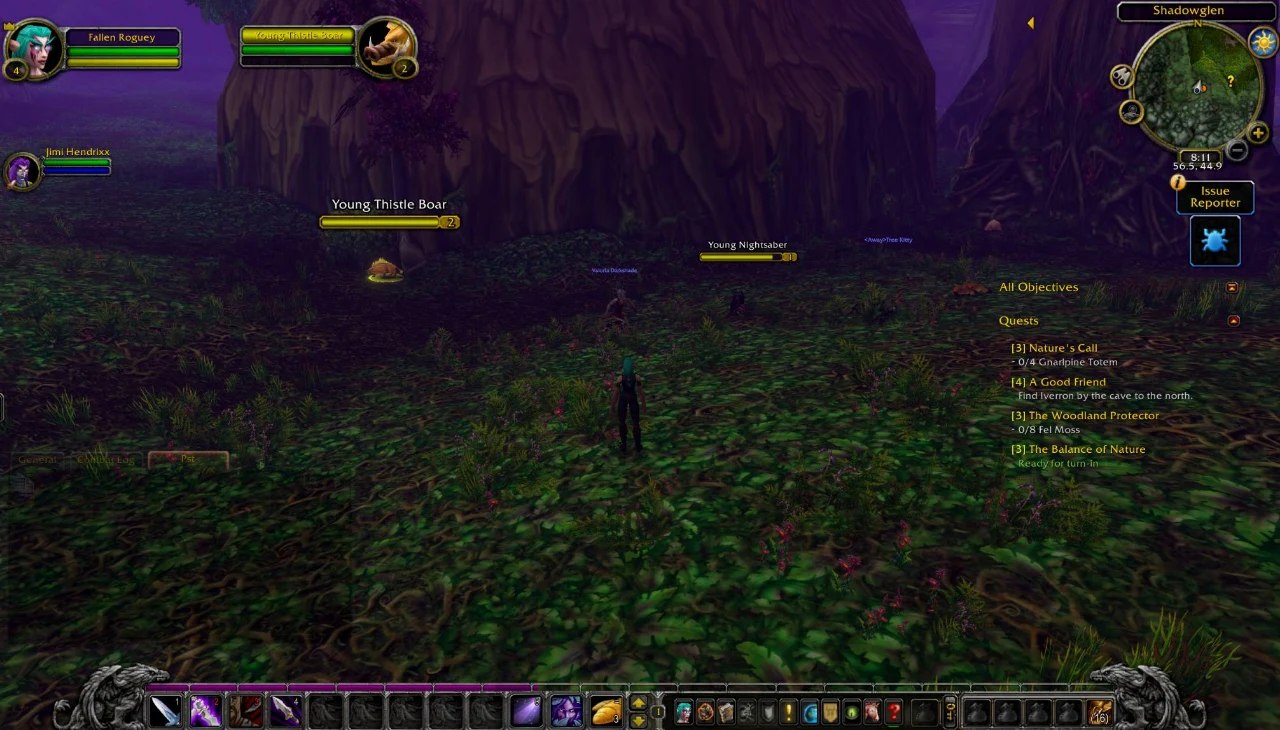
The bottom edge is the telling detail here: gryphons and a stone bar frame the action buttons, while the round minimap keeps its place on the right. This showcase illustrates the appearance; it does not demonstrate compatibility with every screen size or other addon. Original image gallery.
Development is moving quickly
At the time of our check, the latest version is 0.5.4, released September 20, 2026. That day's changelog addresses issues including interface errors in combat and invisible buttons left behind by a closed spellbook. The author's changelog.
That is a reason to read the changes before updating. Recent fixes demonstrate active work, not a guarantee of trouble-free use. We have not played with this addon or benchmarked its performance.
How we would approach trying it
This is our suggested cautious trial, not an installation test we have completed:
- Save your current interface settings and take a screenshot of your layout. Pick a quiet moment, not the minutes before a raid starts.
- Open the author's project page linked above. Check the creator's name, Forever compatibility and the version you are downloading.
- Start with one component, such as the action bar. Then try selecting targets, opening bags, using the quest window and ordinary combat.
- Add other components once the first works with your setup. Avoid changing all your other addons at the same time.
If something breaks, record the version, error message and what you were doing. A focused report is more useful than a long list of changes made simultaneously.
You do not have to bring everything back at once
For us, the appeal of an addon like this is choice. One player's strongest WoW memory might be the action bar; another's might be the old quest window. You do not have to replace everything simply because you can.
Judge the result while using it, too: can you find important information quickly, read the text and still see enough of the world? The best outcome may not be an exact copy of an old screenshot, but an interface you enjoy today.
Our Forever systems overview covers other player choices. You can find more recent stories in the Forever news archive.
The author's own sources
Based on justawower's project information and changelog, checked September 20, 2026. Not a Blizzard bluepost or our own gameplay test. The banner is illustrative; the inline screenshot was published by the author.
Forever · Beta and stress test · 21.10.2026
Forever beta has closed; name reservation is next
Blizzard confirmed Forever beta closed October 23. Priority work, October 27 name reservation and more podcast episodes follow.
News · 23.9.2026
Make time for the campfire · Camping and the Sleeping Bag in Forever
Updated Camping guide: profession skill 20, campfire buffs, the Strength clarification and Camp Tent rested XP, with separate Sleeping Bag beta findings.

Forever · Podcast · 23.10.2026
Forever’s end-of-beta podcast: secrets, leveling and raids at one table
A viewing guide to the official End of Beta Special, with timestamps and context for secrets, levels 30–60 and the raid discussion.